Oaken Notes v1.3: Bring Your Own AI Key
Oaken Notes v1.3 is here — and it’s a big one.
Bring Your Own AI Key
You can now connect your own OpenAI-compatible API endpoint for note enhancements. This means you get to choose the model, the provider, and the quality level, while your audio and transcription stay entirely on your Mac.
How it works:
- Open Settings → AI Provider
- Paste your API key (stored in macOS Keychain, never leaves your device)
- Set your endpoint and model (defaults to OpenAI’s
gpt-4o) - Enhance notes with your chosen model
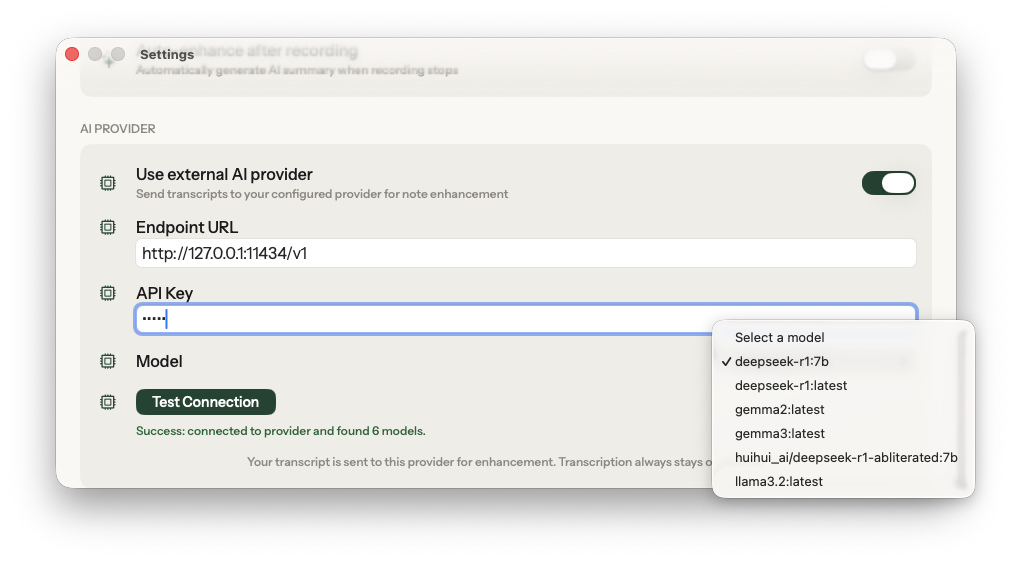
Works with any OpenAI-compatible API: OpenAI, Groq, Together AI, OpenRouter, or even local models via Ollama. One integration, dozens of providers.
Why we built this:
Apple Intelligence is genuinely impressive for on-device processing, but it has limits. Complex strategy sessions, dense discovery calls, and multi-speaker debates produce transcripts that benefit from larger, more capable models. We kept hearing from users: “I love that nothing leaves my Mac, but I wish I could get GPT-4o-quality summaries for important meetings.”
Rather than building yet another cloud middleman, we gave you the keys directly. You pick the provider. You own the connection. Oaken never sees, proxies, or stores what you send. And if you want zero network — run Ollama locally and the entire pipeline stays on your hardware.
What stays on-device: Everything related to audio and transcription. Your recordings are processed by Apple Intelligence locally. The BYO key only applies to note enhancement — turning your transcript into structured summaries, action items, and key decisions.
Unlimited AI Enhancements for Everyone
We’ve removed the 25-enhancement monthly limit on the free tier. Every user now gets unlimited AI-powered note enhancements — whether you use on-device Apple Intelligence or your own API key. No gates, no counters.
PDF Export
Export your meeting notes as beautifully formatted PDFs. Choose what to include: summary, action items, topics, full transcript, or manual notes. Perfect for sharing with colleagues who aren’t in Oaken.
Updated Pricing
With these changes, here’s what Free and Pro look like now:
Free — Unlimited meetings, transcription, AI enhancements, BYO key, speaker detection, export (Markdown + PDF), and Calendar integration. Everything you need to capture and enhance meetings privately.
Pro — Everything in Free, plus iCloud sync across Macs, more templates & custom prompts, Agent Mode (coming soon), and priority support.
MCP Server Support
Oaken Notes v1.3 ships with a built-in MCP (Model Context Protocol) server. This lets any MCP-compatible AI client, Claude Desktop, Cursor, or your own tooling, read and search your meeting notes directly.
What this means in practice: Ask Claude “what did we decide about the pricing model last week?” and it can query your Oaken notes to answer, without you copying and pasting a transcript. Your notes stay local; the MCP server runs on your Mac and responds to queries over a local socket.
To enable it: Open Settings → Integrations → MCP Server, then copy the generated config snippet into your AI client. No cloud, no API keys required for the server itself.
This is the first step toward making Oaken a proper knowledge layer for your meeting history, queryable by the tools you already use.
What’s Next
Agent Mode is in development. Oaken will learn your preferences over time and adapt note structure automatically. Pro subscribers will get early access.
Oaken Notes is a private AI meeting assistant for macOS. Your meetings never leave your Mac.
Download Oaken Notes